Scenario III: Full Agentic Code Development
Questions
What are agentic coding tools and how do they differ from other approaches?
What risks come with giving an AI agent access to your system?
How can I use these tools while maintaining appropriate oversight?
Objectives
Understand how agentic AI coding tools work
Recognize the risks of autonomous code modification and command execution
Learn about sandboxing and permission controls
Develop strategies for supervising AI agents in coding tasks
The agentic scenario
In this scenario, you give an AI agent a high-level task, and it autonomously writes code, executes commands, runs tests, and modifies files to accomplish the goal. You basically become a project manager rather than a coder; depending on the level of automation, you might not even see any of the code that is generated and run.
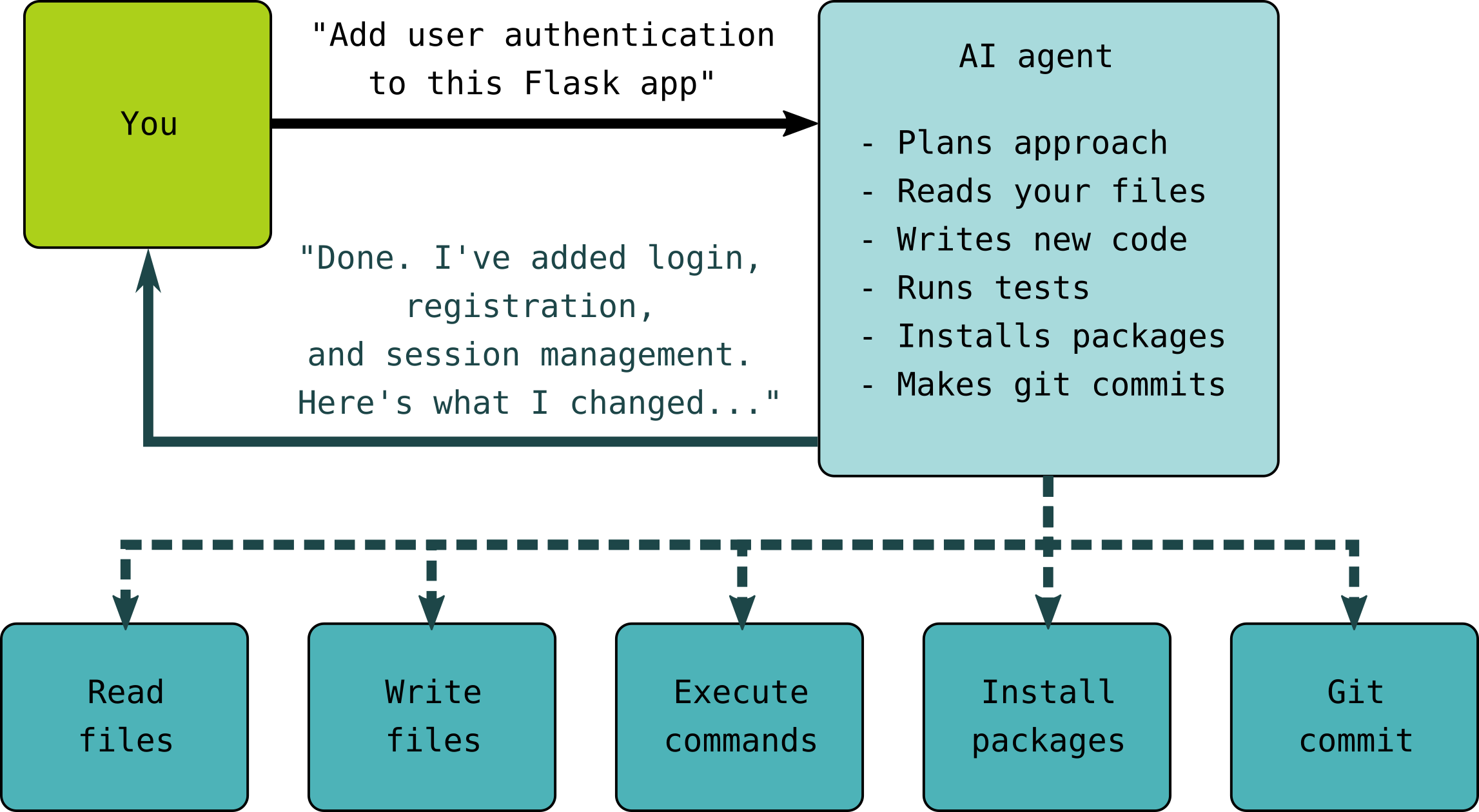
Why this is the highest-risk approach
Autonomous execution: Agent runs commands without per-command approval
System access: May have access to your shell, files, network
Opaque decision-making: Hard to predict what the agent will do
Irreversible actions: Deleted files, pushed commits, installed packages
Landscape of agentic coding tools
There are a few options to go fully agentic. The level of risk can be proportional to the performance of the AI model, with larger proprietary models performing better than smaller ones. This means that a paid subscription is needed to use powerful remote AI models.
OpenCode
OpenCode, an open-source terminal-based coding agent.
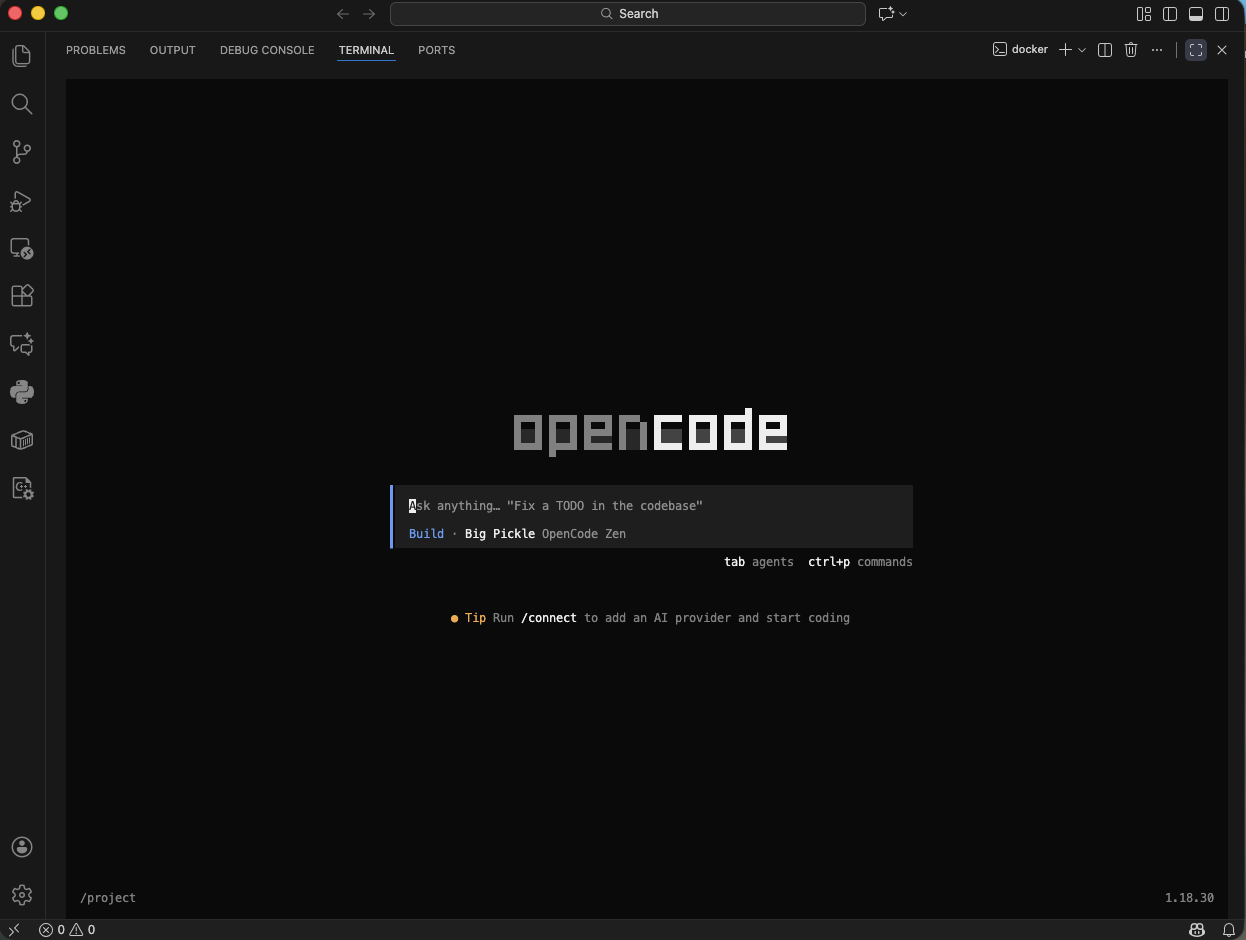
A screenshot to show how the OpenCode command line interface (CLI) looks like.
Capabilities:
read and write project files
execute shell commands
install packages
work across multiple files
use different AI model providers
Safety features:
Review the agent’s plan before allowing it to make changes.
OpenCode can read and write files and run shell commands, so only give it access to the files and environment you intend to use.
For demonstrations and experiments, consider running OpenCode inside a sandbox such as Docker.
Avoid running agentic tools with access to production systems, secrets, or sensitive credentials.
OpenCode: Beginner Cheatsheet
Before anything: security mindset
OpenCode can read, write, delete files and run shell commands on your machine
By default it asks permission at each step — do not skip this
Always work inside a git repo so you can undo (
git diff,git restore)Never run it on production systems or with credentials in your environment
Human-in-the-loop: plan mode first (docs)
Press
Tabto enter plan mode before OpenCode does anythingOpenCode reads your codebase, drafts a step-by-step plan, then stops and waits
You review, edit, or reject the plan before any file is touched
This is the recommended default for beginners — always plan before you execute
Key built-in slash commands (docs)
/connect— connect a model provider/init— initialize project instructions in AGENTS.md/undoand/redo— undo/redo agent changes/share— share a conversation/help— show commands/exit— quit OpenCode
How OpenCode remembers things: three layers (docs)
AGENTS.md— persistent project guidance; coding standards, build commands, architecture notes, and team conventions. Put it in the repo root and commit it.Instructions (opencode.json) — additional instruction sources for more specialized project guidance. Useful for keeping the main AGENTS.md focused. (docs)
Skills (
.opencode/skills/<name>/SKILL.md) — reusable procedures OpenCode can discover and load when relevant, such as releases, migrations, testing, or code review. (docs)
Subagents — keeping context clean (docs)
OpenCode can launch subagents in separate child sessions with fresh context
They handle focused research/search tasks and return results — keeping the main agent’s context cleaner
Built-in subagents include Explore and General
Permissions can be configured per agent — subagents are not a security boundary
Context window tips (docs)
Use
/compactwhen context fills up,/clearbetween unrelated tasks@filenameto include specific files directly in context!commandto inject shell output directly into context
Sandboxing and permission control
Coding with agentic agents can potentially affect more of the system than intended.
Sandboxing means running the agent inside an isolated environment with limited access to the host computer. For example, a Docker container can expose only the project directory that the agent needs.
Demo: Iris dataset analysis with OpenCode
in this excersize we consider two setups:
Without sandboxing — OpenCode runs directly on the local machine and can use the tools and files available to the current user.
Setup: project folder and environment
cd agentiris
mamba create python=3.11 -p ./env
conda activate ./env
curl -fsSL https://opencode.ai/install | bash
opencode
With sandboxing — OpenCode runs inside a Docker container with access only to the project directory and the tools installed in that container.
The non-sandboxed setup is simpler, while the sandboxed setup provides better isolation and more control over what the agent can access.
Setup: project folder and environment
cd agentiris

cat > Dockerfile <<'EOF'
FROM python:3.11-slim

RUN apt-get update && apt-get install -y \
    curl \
    git \
    make \
    && rm -rf /var/lib/apt/lists/*

RUN curl -fsSL https://opencode.ai/install | bash

ENV PATH="/root/.opencode/bin:$PATH"

WORKDIR /project
EOF
docker build -t irisagent-demo .

docker run -it --rm \
  -p 8000:8000 \
  -v "$(pwd):/project" \
  -w /project \
  irisagent-demo bash
opencode
In OpenCode: switch to plan mode first
Press Shift+Tab to enter plan mode, then paste this prompt:
I want to download the Iris dataset for a demonstration of the type of
visualisation and data analysis that we can do quickly.

Plan a few visualisations, descriptive statistics, and analyses of the
dataset. Something quick for demonstration, not too many analyses.

Initialise also a local git repository.

Store the iris data inside a subfolder "data" and the python code in a
subfolder "src". Results will go into a subfolder "results".

For visualisations I like to use Altair as a library. This session is
running inside a mamba environment so you can use mamba install to add
packages that are missing.
OpenCode will read your environment, draft a plan, and stop
Review the plan before pressing Enter to approve
Only then will it start creating files and running code
Follow-up prompt: generate a Sphinx report
Once the analysis is done, use this second prompt (still in plan mode):
Create a "docs" subfolder and initialise a Sphinx documentation project
using the Read the Docs theme. Then write a report documenting the Iris
dataset analysis we just performed: describe the methods, include the
results and any figures produced, and structure it as a readable
scientific report.
OpenCode will wire up Sphinx, write the
.rstsource files, and link the figures fromresults/Review the plan — Sphinx setup touches several config files
After approval, you can build the docs with
make htmlinsidedocs/
More agentic tools
Claude code and Codex are the OpenAI alternative to OpenCode, which need subscriptions.
Practitioner’s perspective: A real Claude Code session
Simon Willison documented a real project built with Claude Code—a colophon page showing the commit history of tools he’d built. The session took 17 minutes and cost $0.61 in API calls.
His prompting sequence:
“Build a Python script that checks the commit history for each HTML file and extracts any URLs from those commit messages…”
[Inspected output, found issues] “It looks like it just got the start of the URLs, it should be getting the whole URLs…”
“Update the script—I want to capture the full commit messages AND the URLs…”
“This is working great. Write me a new script called build_colophon.py…”
[Got wrong output] “It’s not working right. ocr.html had a bunch of commits but there is only one link…”
“It’s almost perfect, but each page should have the commits displayed in the opposite order—oldest first”
“One last change—the pages are currently listed alphabetically, let’s instead list them with the most recently modified at the top”
Key observations:
Started with vibe-coding (didn’t look at the code it wrote)
Iterated based on observable output
Gave specific, concrete feedback when things were wrong
Let the agent handle implementation details
“I was expecting that ‘Test’ job, but why were there two separate deploys? […] It was time to ditch the LLMs and read some documentation!”
Even experienced practitioners reach points where they need to take over.
Other tools
Tool |
Type |
Key Characteristic |
|---|---|---|
Aider |
Terminal |
Open source, multiple model support |
GitHub Copilot coding agent |
Web |
PR-centric workflow |
Continue |
IDE extension |
Open source, customizable |
Claude Code |
Anthropic |
CLI-based, git integration, sandboxing |
OpenAI Codex |
OpenAI |
CLI-based, git integration, sandboxing |
Gemini CLI |
Multimodal, Google integration |
|
Cursor |
Cursor Inc. |
AI-native IDE with agent mode |
Cline |
Cline |
IDE/CLI agent, file editing, command execution, multiple models |
Devin |
Cognition |
Autonomous software engineer, testing, debugging, pull requests |
OpenHands |
Open source |
Autonomous coding agent, terminal and repository interaction |
What can possibly go wrong?
Agentic tools can cause serious problems if not properly supervised.
I was having the Claude CLI clean up my packages in an old repo, and it nuked my whole Mac! (source)
File system risks
Potential agent actions:
- Delete important files (rm, unlink)
- Overwrite configurations
- Modify files outside project directory
- Fill disk with generated content
Real example: Agents have been observed attempting commands like
rm -rf ~/ when confused about cleanup tasks.
Command execution risks
Dangerous commands an agent might run:
- curl ... | bash          (arbitrary code execution)
- pip install <package>    (supply chain risk)
- chmod 777 ...            (security weakening)
- ssh, scp                 (network access)
Data exfiltration risks
Ways agents could leak data:
- Include in API requests to the AI service
- Execute curl/wget to external URLs
- Write to network-accessible locations
- Include in git commits pushed to public repos
Package installation risks (Hallucination attacks)
AI models sometimes suggest packages that don’t exist. Attackers can:
Monitor AI suggestions for hallucinated package names
Register those packages on PyPI/npm with malicious code
Wait for developers to install them
This is called “slopsquatting”:
AI suggests:    pip install flask-security-utils
Reality:        This package doesn't exist... or does it now?
                An attacker may have registered it with malware
Supply chain attacks are real
The 2024 xz-utils backdoor showed how sophisticated supply chain attacks can be. Agentic tools that install packages without verification increase this attack surface significantly.
Social risks
some open source projects have contribution guidelines limiting or excluding use of AI tools. Agents may ignore them. (e.g. Manyfold tries to counter this with a creative
Agents.mdfile)generated low quality PRs cost maintainers of open source projects time. (e.g. PR of a lazy agent)
Agents may interact with other humans in inappropriate ways (e.g. agent writing a hitpiece because its PR got closed)
Permission models and controls
Different tools offer different levels of control:
Claude Code permission system
Claude Code asks for permission before certain operations:
Claude wants to run: pip install pandas
Allow? [y/n/always/never]
You can configure default permissions:
// .claude/settings.json
{
  "permissions": {
    "allow_file_read": true,
    "allow_file_write": "ask",
    "allow_shell_commands": "ask",
    "allow_network": false
  }
}
YOLO: You Only Live Once
YOLO Mode in Coding Agents
YOLO = You Only Live Once — agent acts without asking permission at each step
Normal mode: Claude asks you to approve every file write, command, deletion…
YOLO mode:
claude --dangerously-skip-permissions— it just does it
What it’s good for (or is it even?)
Well-scoped tasks: fix this bug, migrate this framework, add tests
Automated pipelines (CI, scheduled scripts)
Works best when you review results via git diff afterward
Risks & Mitigations
Agent can delete files, run destructive commands, commit/push — no undo prompts
Malicious content in READMEs or comments can hijack the agent (prompt injection)
Mitigation: run in a Docker container or VM, not your main machine
Always have git as your safety net — review before merging
Sandboxing levels
Level |
What it restricts |
Tools |
|---|---|---|
None |
Full system access |
Dangerous! |
Process |
Network, some syscalls |
Bubblewrap, Seatbelt |
Container |
Filesystem, network |
Docker |
VM |
Everything |
Firecracker microVM |
Practical sandboxing with Docker
Run your agent inside a container:
# Create a Dockerfile for your project
FROM python:3.11-slim

WORKDIR /project
COPY . .

# Install dependencies
RUN pip install -r requirements.txt

# Run agent inside container
# Run with limited access
docker run -it \
  --network none \          # No network access
  --read-only \             # Read-only root filesystem
  --tmpfs /tmp \            # Writable tmp only
  -v $(pwd):/project \      # Mount project directory
  my-agent-container
Supervision strategies
If you choose to use agentic tools, implement these safeguards:
1. Start with read-only mode
Many tools have modes where they can only suggest, not execute:
# Claude Code in plan-only mode
claude --allowedTools "Read,Grep,Glob"
# or
claude --permission-mode plan
2. Review all proposed changes
Agent proposes changes to 3 files:
  [M] src/main.py      (+15, -3)
  [M] src/utils.py     (+8, -0)
  [A] tests/test_main.py (+45)

Review changes? [y/n]
Never skip this step. Read every change.
3. Use version control religiously
# Before any agentic session
git status                    # Check clean state
git stash                     # Stash any changes
git checkout -b ai-experiment # Work on a branch

# After agent finishes
git diff                      # Review all changes
git add -p                    # Stage selectively
git commit                    # Or git reset --hard to undo
4. Set up monitoring
Watch what the agent is doing:
# In another terminal, watch file changes
watch -n 1 'git status'

# Or use a file system watcher
fswatch -r . | while read f; do echo "Modified: $f"; done
5. Limit scope
Give agents minimal access:
Good: "Fix the bug in parse_data() function in src/parser.py"
Bad:  "Fix all the bugs in the project"

Good: "Add a unit test for the validate_email function"
Bad:  "Set up the entire test infrastructure"
When agentic tools make sense (and when they don’t)
Appropriate use cases
Boilerplate generation: “Create a Flask app skeleton”
Test generation: “Write unit tests for this module”
Documentation: “Generate docstrings for these functions”
Refactoring: “Rename this variable across all files”
Exploration: “Explain how this codebase handles authentication”
Inappropriate use cases
Production deployments: Too much can go wrong
Database migrations: Need human review
Security-critical code: Don’t trust without verification
Code with sensitive data: Risk of exposure
Unfamiliar codebases: You can’t verify what you don’t understand
Be ready to take over
Even with excellent tools, there comes a point where human expertise is needed.
Practitioner’s perspective: Know when to step in
“LLMs are no replacement for human intuition and experience. I’ve spent enough time with GitHub Actions that I know what kind of things to look for, and in this case it was faster for me to step in and finish the project rather than keep on trying to get there with prompts.”
— Simon Willison
His colophon project worked, but something wasn’t right: there were two deploy jobs running. Rather than continue prompting, he read the documentation and found a settings switch that needed changing.
The skill is knowing when:
More prompting won’t help
You need to understand the underlying system
Reading documentation is faster than iterating
The AI is confidently going in the wrong direction
The most effective approach combines AI speed with human oversight—not blind trust in either direction.
Exercises
Exercise Agent-1: Explore an agent (read-only)
If you have access to an agentic tool (Claude Code, Cursor, etc.):
Start it in read-only or plan-only mode
Give it a task: “Explain the structure of this project”
Observe:
What files does it try to read?
What is its reasoning process?
How does it present findings?
Do NOT allow it to make any changes yet
This helps you understand how the agent “thinks” before giving it write access.
Solution
Key observations to make:
The agent typically starts by reading project structure (ls, tree)
It then reads key files (README, main entry points, config)
It may make assumptions that are wrong about your project
Its explanation reveals its understanding (which may have gaps)
This exploration builds trust incrementally before allowing modifications.
Exercise Agent-2: Sandboxed experiment
Set up a sandboxed environment to safely experiment with agentic tools:
Create a test project directory with some simple Python files
Initialize a git repository
If using Docker:
docker run -it --network none -v $(pwd):/project python:3.11 bash
If not using Docker, at minimum:
Work in a dedicated directory
Keep version control active
Don’t give the agent access to sensitive directories
Try giving the agent a simple task and observe its behavior
Solution
The exercise teaches:
How to isolate experiments from important data
The importance of version control as a safety net
How agents behave when they have limited access
The difficulty of truly sandboxing modern tools (they often need network access to function)
Solution
This exercise builds security awareness. Key findings typically include:
Most agentic tools require network access to the AI provider
Few offer fully local operation
Audit logs are often incomplete
Credential handling varies widely
Documentation may not cover all data flows
Safeguards should include version control, network monitoring, and credential isolation.
Comparison: When to use each scenario
Factor |
Scenario I (Chat) |
Scenario II (IDE) |
Scenario III (Agent) |
|---|---|---|---|
User control |
Full |
Moderate |
Limited |
Speed |
Slow |
Fast |
Fastest |
Visibility |
Complete |
Partial |
Low |
Risk level |
Low |
Medium |
High |
Best for |
Learning, design |
Routine coding |
Boilerplate, refactoring |
Avoid for |
Large volumes |
Sensitive code |
Production systems |
Summary
Agentic coding tools offer the most automation but also the highest risk:
They can read files, execute commands, and modify your codebase
Risks include data exposure, malicious packages, and destructive actions
Sandboxing and permission controls provide some protection
Version control is your essential safety net
Always review all changes before accepting them
The question isn’t “Should I ever use agentic tools?” but rather “For which tasks, with what safeguards, and how much supervision?”
See also
Simon Willison: Claude Code example with transcript - Real-world agentic session
DataNorth: Claude Code Complete Guide - Comprehensive comparison with other tools
Keypoints
Agentic tools can read, write, and execute without per-action approval
Risks include file deletion, data exposure, and supply chain attacks
Use sandboxing (Docker, Bubblewrap) to limit agent access
Always use version control and review all changes
Match tool autonomy to task risk, use agents for low-stakes tasks